 Gunni
GunniWhat is MCP
MCP (Model Context Protocol) is an open standard that lets AI assistants call external tools in a structured way. When you connect Gunni via MCP, your AI client (Claude Desktop, Cursor, Claude Code) gains the ability to generate images, video, audio, and more directly in conversation. No copy-pasting URLs or switching windows.
Gunni exposes its full toolset through an MCP server hosted at https://api.gunni.ai/mcp. OAuth-capable clients (Claude Desktop, Claude Code, Cursor) authenticate via browser sign-in. For other clients, create an API key at gunni.ai/keys and pass it as a Bearer token.
Claude Desktop
Claude Desktop supports adding MCP servers directly from the UI. No config files needed.
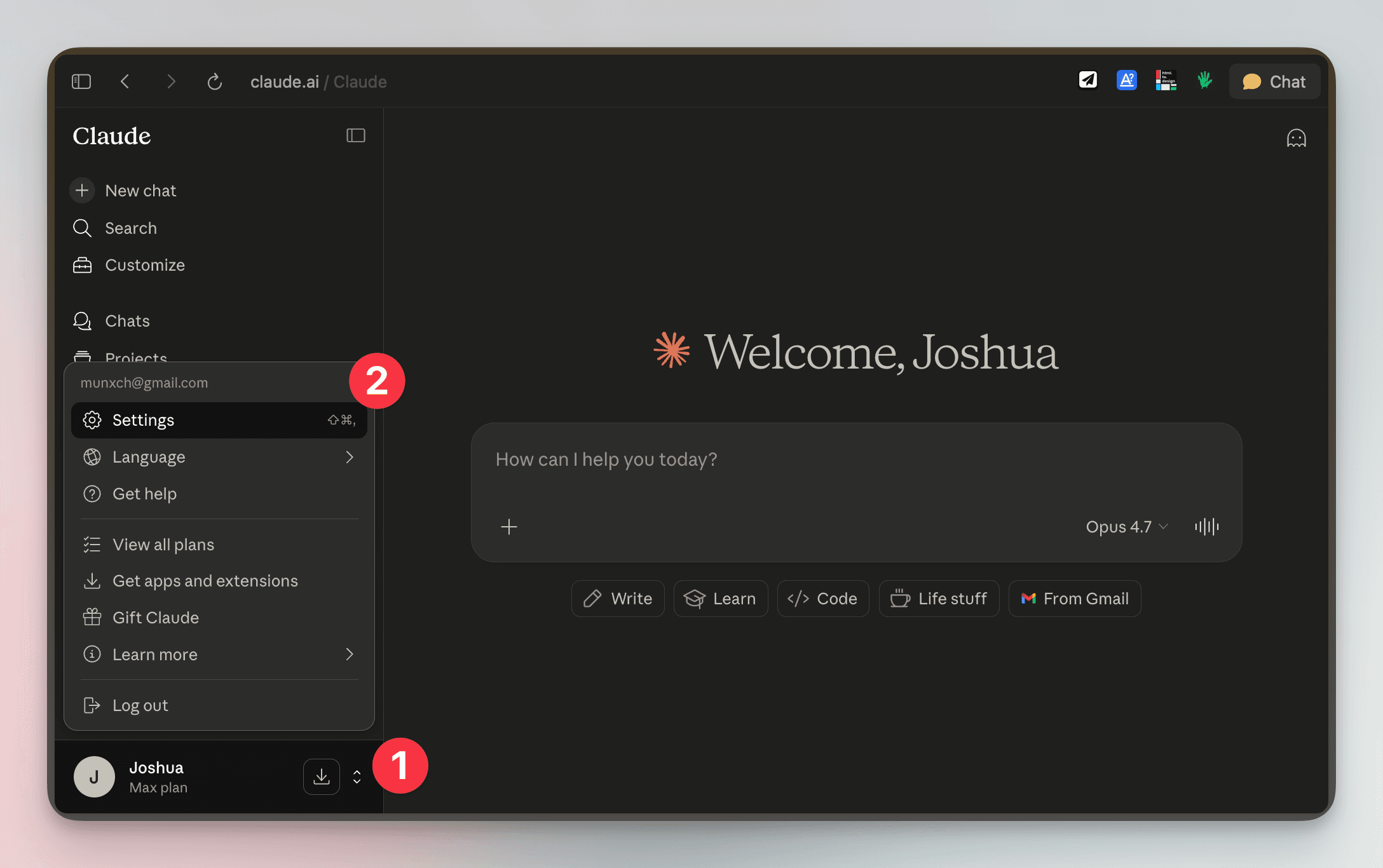
Click your profile in the bottom-left, then click Settings
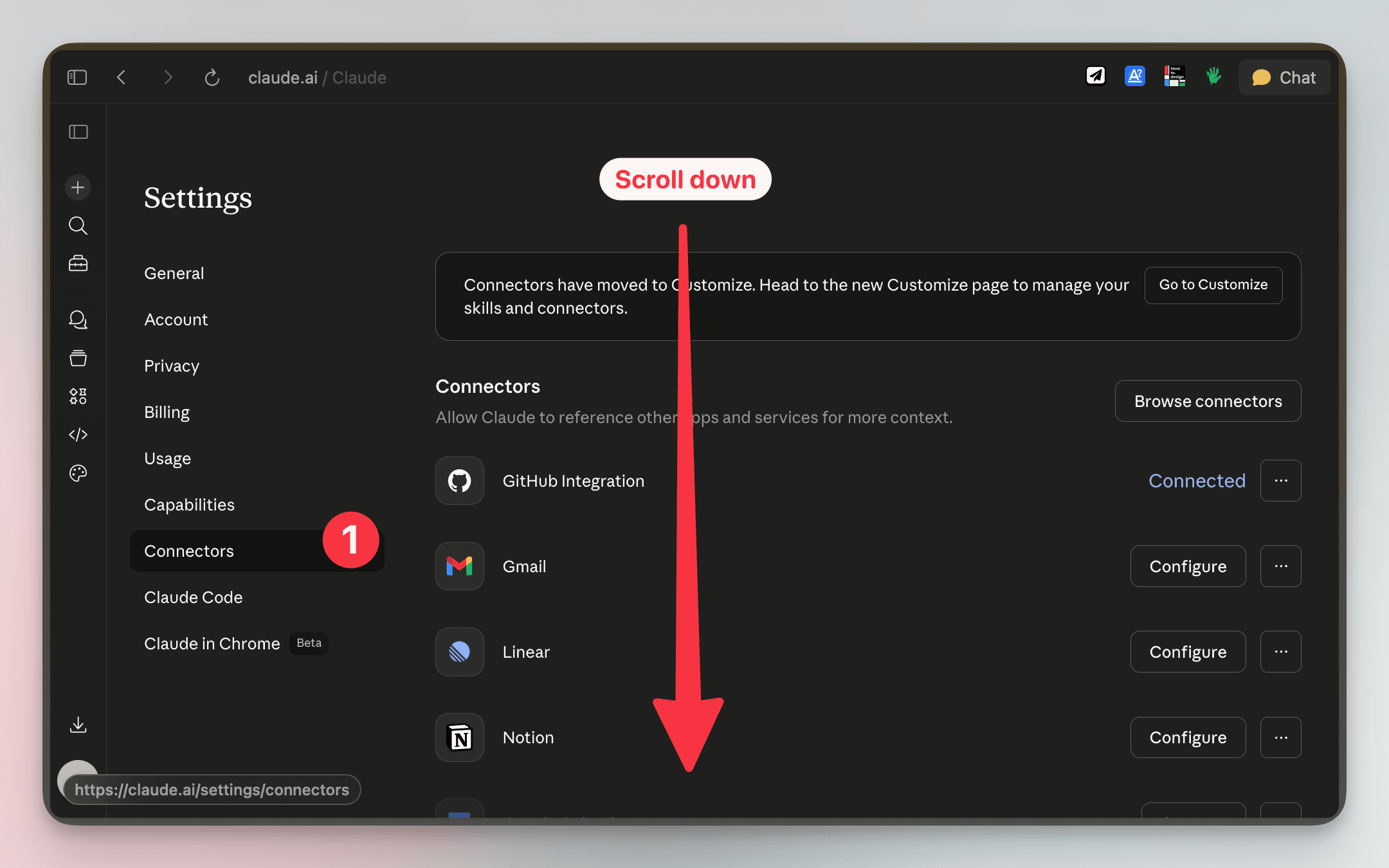
Click Connectors in the sidebar and scroll down
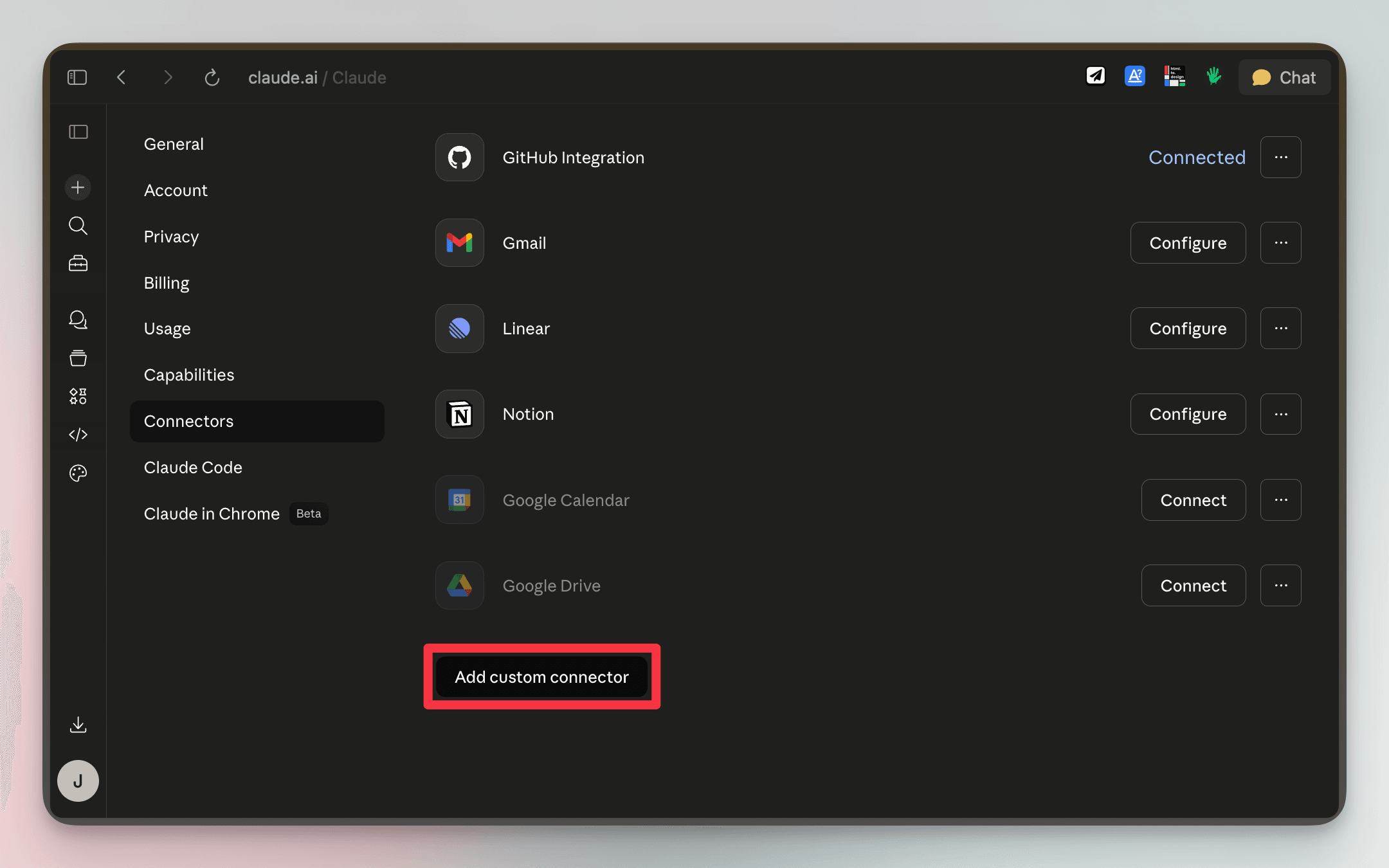
Click Add custom connector
Enter name Gunni and paste the server URL:
https://api.gunni.ai/mcp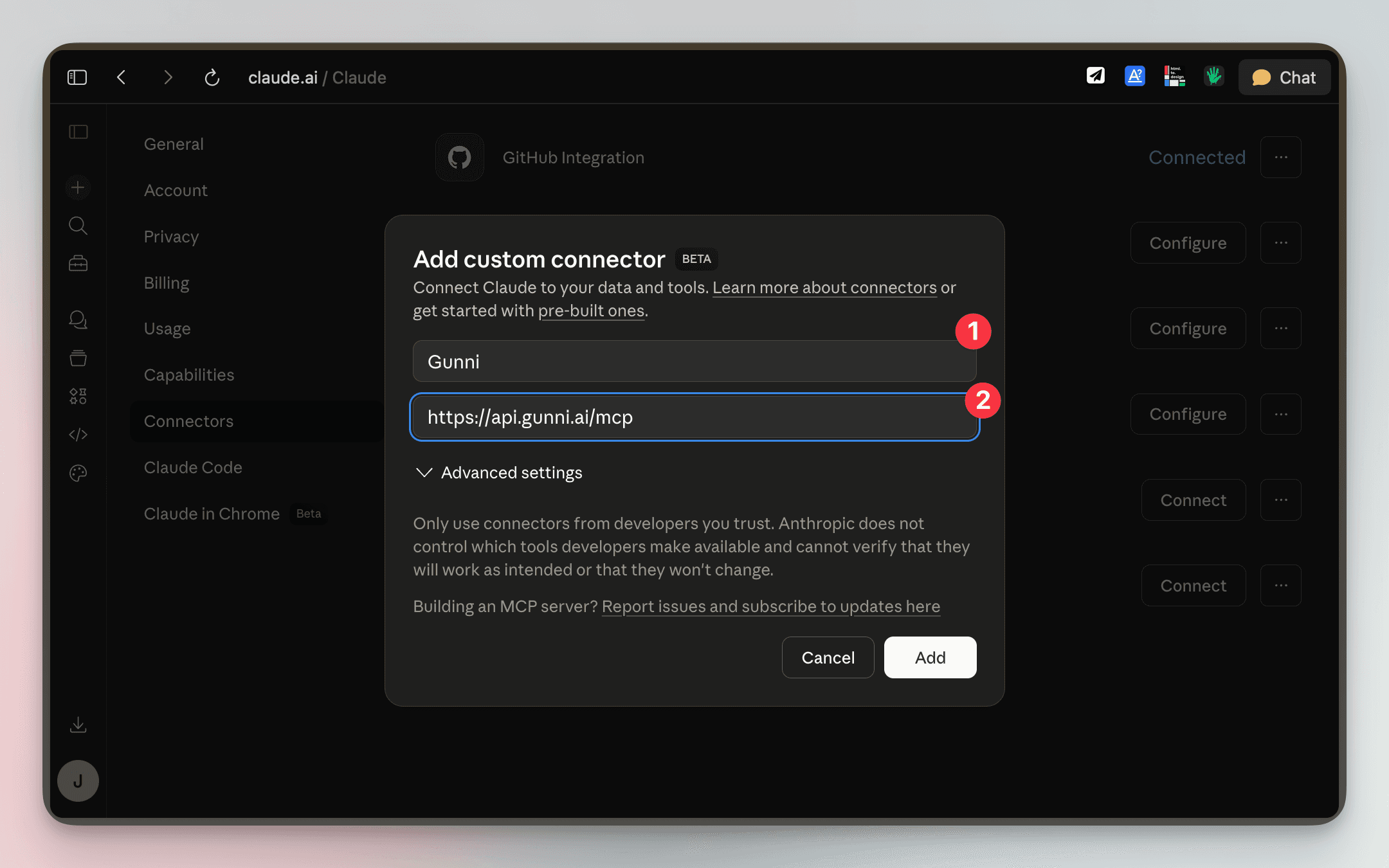
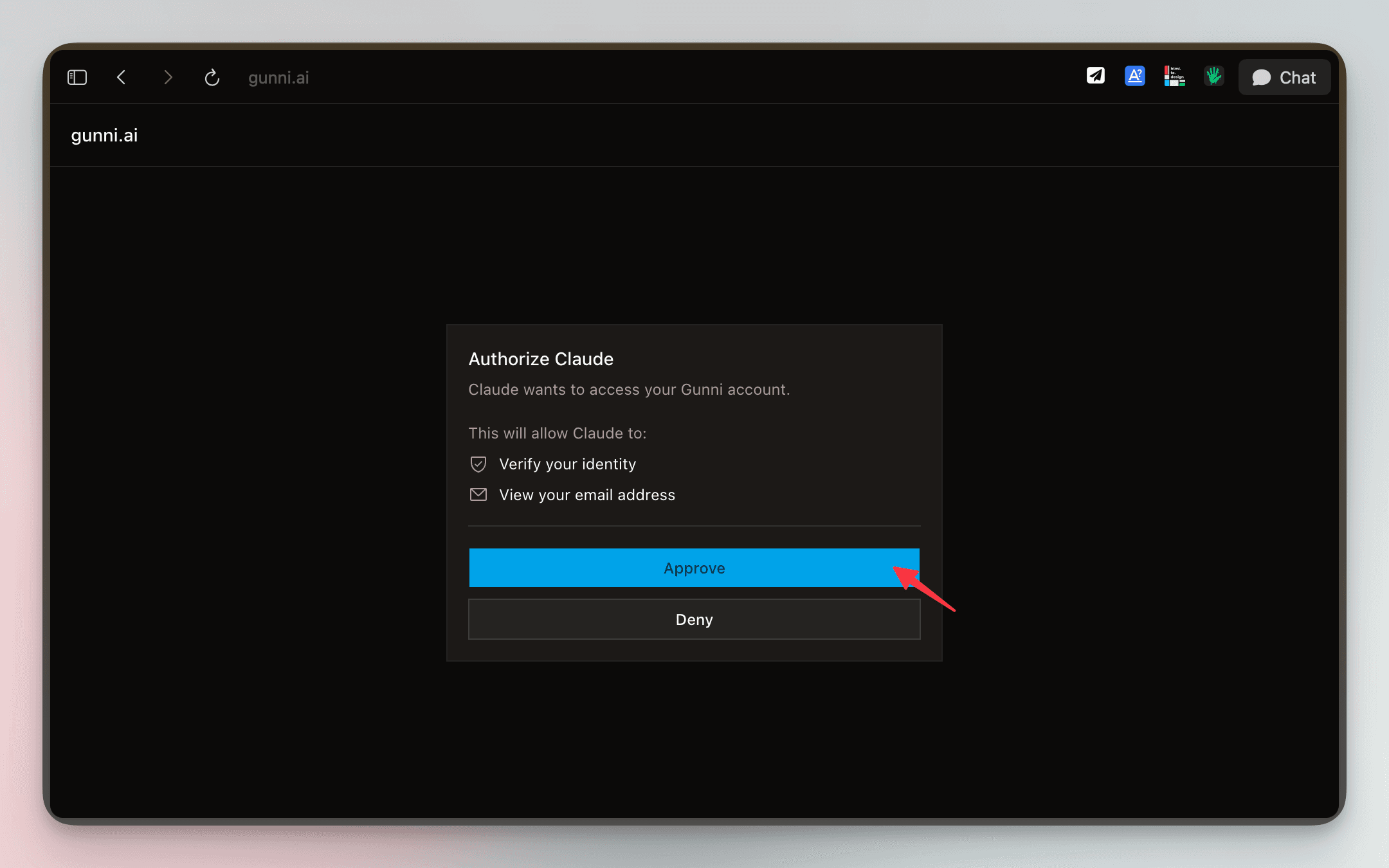
Click Add, then Approve to authorize Claude to access your Gunni account
Cursor Setup
Open Cursor settings, navigate to the MCP section, and add the Gunni server. Cursor supports OAuth — it will prompt you to sign in automatically:
{
  "mcpServers": {
    "gunni": {
      "type": "http",
      "url": "https://api.gunni.ai/mcp"
    }
  }
}
If your version of Cursor doesn't support OAuth, add an API key from gunni.ai/keys instead:
{
  "mcpServers": {
    "gunni": {
      "type": "http",
      "url": "https://api.gunni.ai/mcp",
      "headers": {
        "Authorization": "Bearer YOUR_API_KEY"
      }
    }
  }
}
Claude Code Setup
Two steps: add the server, then authenticate.
Add the MCP server:
claude mcp add --transport http gunni https://api.gunni.ai/mcpStart a Claude Code session and run /mcp to authenticate. This opens your browser to sign in to your Gunni account.
/mcpAfter authenticating, Gunni tools are available in all conversations within that project. You can also add it via a .mcp.json file in your project root:
{
  "mcpServers": {
    "gunni": {
      "type": "http",
      "url": "https://api.gunni.ai/mcp"
    }
  }
}
OpenClaw Setup
Gunni is available as an AgentSkill on ClawHub, the OpenClaw skill registry.
clawhub install gunniSet your GUNNI_API_KEY in your OpenClaw environment config or .env file:
GUNNI_API_KEY=your_key_hereAfter installation, the agent can call Gunni skills through natural conversation. No additional per-call setup required.
Generation Tools
These tools create media and consume credits.
image
Generate, edit, upscale, describe, or remove the background from an image. Auto-routes based on the combination of parameters provided.
| Name | Type | Default | Description |
|---|---|---|---|
| prompt | string | — | Text prompt for generation or editing. Optional if using upscale, remove_bg, or describe. |
| image | string | string[] | — | Input image URL(s). Triggers edit, describe, upscale, or remove_bg mode. |
| model | string | — | Override the default model for this operation. |
| output | string | — | Output file path (CLI) or filename hint (MCP). |
| width | number | — | Output width in pixels. |
| height | number | — | Output height in pixels. |
| seed | number | — | Seed for reproducible results. |
| upscale | boolean | — | Upscale the input image. |
| remove_bg | boolean | — | Remove the background from the input image. |
| scale | number | 2 | Upscale factor. Accepts 2 or 4. |
| variants | number | 1 | Number of variants to generate. |
| style | string | — | Apply a saved visual style by name. |
| template | string | — | Apply a saved template by name. |
video
Generate video from a still image or text prompt.
| Name | Type | Default | Description |
|---|---|---|---|
| image | string | — | Input image URL for image-to-video mode. |
| prompt | string | — | Text prompt describing the desired motion or scene. |
| model | string | — | Override the default video model. |
| output | string | — | Output file path or filename hint. |
| duration | number | — | Video duration in seconds (typically 5 or 10). |
| style | string | — | Apply a saved visual style by name. |
| template | string | — | Apply a saved template by name. |
audio
Convert text to natural-sounding speech.
| Name | Type | Default | Description |
|---|---|---|---|
| text | string | — | The text to synthesize into speech. |
| model | string | minimax-speech | TTS model to use. |
| output | string | — | Output file path or filename hint. |
| voice | string | — | Voice ID or name (model-dependent). |
lipsync
Lip synchronization: sync audio to a video, or animate an image to speak.
| Name | Type | Default | Description |
|---|---|---|---|
| video | string | — | Input video URL for lip sync mode. |
| image | string | — | Input image URL for avatar mode. |
| audio | string | — | Audio URL to sync. |
| model | string | — | Model to use (kling-lipsync, kling-avatar, sync-lipsync). |
| output | string | — | Output file path or filename hint. |
Knowledge Tools
These tools are free and do not consume credits.
learn
Access the creative knowledge base. Returns guides on prompting, brand design, video production, and more.
| Name | Type | Default | Description |
|---|---|---|---|
| topic | string | — | Topic to learn about (e.g. prompting, brand, video). |
models
List available models and their capabilities.
| Name | Type | Default | Description |
|---|---|---|---|
| category | string | — | Filter by model category (image, video, audio, etc.). |
| updates | boolean | — | Show recent model updates and additions. |
history
Search your past generations.
| Name | Type | Default | Description |
|---|---|---|---|
| query | string | — | Search query to filter results. |
| limit | number | 20 | Maximum number of results to return. |
visual_research
Search for reference images and visual inspiration.
| Name | Type | Default | Description |
|---|---|---|---|
| query | string | — | Search query for visual research. |
| num | number | 6 | Number of results to return (max 20). |
Workspace & Asset Tools
These tools manage your workspaces, assets, and saved prompts. All are free and do not consume credits.
workspace
View the active workspace and its context.
workspace_create
Create a new workspace.
| Name | Type | Default | Description |
|---|---|---|---|
| name | string | — | Workspace name. |
| context | string | — | Freeform creative context (brand, colors, references). |
workspace_switch
Switch to a workspace by name. Automatically loads the asset library.
| Name | Type | Default | Description |
|---|---|---|---|
| name | string | — | Name of the workspace to switch to. |
assets
List assets in the current workspace.
| Name | Type | Default | Description |
|---|---|---|---|
| name | string | — | Name of a specific asset to retrieve. |
asset_save
Save an image URL as a named asset.
| Name | Type | Default | Description |
|---|---|---|---|
| url | string | — | URL of the image to save. |
| name | string | — | Name for the asset. |
asset_rename
Rename an asset and optionally pin it.
| Name | Type | Default | Description |
|---|---|---|---|
| id | string | — | Asset ID to rename. |
| name | string | — | New name. |
| pin | boolean | — | Pin the asset to the workspace. |
upload_asset
Upload a local image (triggers a signed URL upload flow).
| Name | Type | Default | Description |
|---|---|---|---|
| name | string | — | Name for the asset. |
prompts
List saved prompts in the current workspace.
| Name | Type | Default | Description |
|---|---|---|---|
| name | string | — | Name of a specific saved prompt. |
prompt_save
Save a prompt recipe for reuse.
| Name | Type | Default | Description |
|---|---|---|---|
| name | string | — | Unique prompt identifier. |
| prompt | string | — | The prompt text. |
| model | string | — | Recommended model. |
prompt_delete
Delete a saved prompt.
| Name | Type | Default | Description |
|---|---|---|---|
| name | string | — | Name of the prompt to delete. |
Image Tool Routing
The image tool automatically selects the right operation based on the combination of parameters you provide. No need to call separate tools for generate, edit, describe, upscale, or background removal.
| Input | Operation | Default Model |
|---|---|---|
| prompt only | Generate a new image | nano-banana |
| image + prompt | Edit the image using the prompt | nano-banana-edit |
| image only | Describe the image | florence-2 |
| image + upscale: true | Upscale the image | topaz-upscale |
| image + remove_bg: true | Remove background | bria-bg-remove |